Implementation guide
Palo Alto VM-Series behind a Gateway Load Balancer on AWS
Traffic inspection on AWS with two Palo Alto firewalls spread across two availability zones. Bump-in-the-wire mode: no NAT, no overlay routing, and no routing done by the firewall.
- Zones
- 2 · one per AZ
- Encapsulation
- GENEVE · UDP 6081
- Health check
- TCP 80
- Cross-zone
- disabled
- PAN-OS
- 11.1
- Plugin
- vm_series 5.x
ArchitectureWhat gets built
A Gateway Load Balancer spreads traffic across two VM-Series, one per zone. The firewall neither routes nor rewrites addresses: it receives the packet encapsulated in GENEVE, inspects it and returns it down the same tunnel.
Zonal symmetry is deliberate. With cross-zone load balancing disabled, traffic entering through one zone's endpoint is inspected on that same zone's firewall and returns the way it came. That keeps the session on a single firewall, which is what a stateful device needs, and avoids cross-zone data charges.
fwdata: that is why the health check
arrives from an address on that same network and is intrazone traffic.
AddressingFive subnets per zone
Each role needs its own subnet because each carries a different route table. Mixing them is the fastest way to create a loop between the endpoint and the workload.
| Role | What lives there | AZ a | AZ b |
|---|---|---|---|
| public | NAT gateway | 10.20.0.0/24 | 10.20.10.0/24 |
| mgmt | VM-Series eth0 | 10.20.1.0/24 | 10.20.11.0/24 |
| fwdata | VM-Series eth1 and the GWLB nodes | 10.20.2.0/24 | 10.20.12.0/24 |
| gwlbe | GWLB endpoint | 10.20.3.0/24 | 10.20.13.0/24 |
| app | workloads | 10.20.4.0/24 | 10.20.14.0/24 |
What route each table carries
- app —
0.0.0.0/0to its own zone's endpoint. Everything leaving the workload goes to inspection. - gwlbe —
0.0.0.0/0to the NAT gateway, plus propagation from the virtual private gateway. This is the table that decides where already-inspected traffic goes. - fwdata — the local route only. GENEVE is born and dies inside the VPC.
- VGW edge — the app subnets pointing at their endpoint. Without this table, traffic arriving from the tunnel goes straight to the workload without passing through the firewall.
ScopeWhat gets inspected and what does not
Worth deciding before writing the policy, because the three paths do not all come for free.
| Path | How it reaches inspection | Status |
|---|---|---|
| Hybrid on-prem ↔ workload |
Edge route table on the virtual private gateway | works |
| Egress workload → internet |
0.0.0.0/0 on the app table towards the endpoint |
works |
| East-west app-a ↔ app-b |
Requires routes more specific than the VPC's local of the VPC |
see limitations |
CostsWhat it costs to leave this running
Almost 3 dollars an hour, and four out of every five go to the firewall licence, not to AWS infrastructure.
Rates for us-east-1: infrastructure queried against the AWS
pricing API, software against the PAYG listing's dimensions table. Data
transfer not included.
| Item | USD/hour | × | USD/month |
|---|---|---|---|
VM-Series licence — PAYG, m5.xlarge | 1.1700 | 2 | 1,708.20 |
VM-Series — compute m5.xlarge | 0.1920 | 2 | 280.32 |
| NAT gateway | 0.0450 | 2 | 65.70 |
| Site-to-site VPN connection | 0.0500 | 1 | 36.50 |
Workloads t3.micro | 0.0104 | 2 | 15.18 |
| GWLB endpoint | 0.0100 | 2 | 14.60 |
| Public IPv4 in use | 0.0050 | 4 | 14.60 |
| EBS gp3 — 2×60 GB + 2×8 GB | 0.0149 | — | 10.88 |
| Gateway Load Balancer | 0.0125 | 1 | 9.12 |
| GWLB — capacity (minimum LCU) | 0.0040 | 1 | 2.92 |
| Total | 2.9562 | 2,158.03 |
| If left running | Cost | Breakdown |
|---|---|---|
| one hour | 2.96 USD | licence 79 % · compute 13 % · network 8 % |
| one day | 70.95 USD | |
| one month | 2,158 USD |
The licence rules
The software charge on the PAYG listing is six times the compute cost of the same instance: 1.17 against 0.192 an hour. It is billed through AWS Marketplace, which is why it shows up neither in the pricing API nor in estimates that only look at AWS resources.
The price goes by instance size , not by family: every
xlarge pay 1.17, the large 0.99, the
2xlarge 1.80 and the 4xlarge 3.69. Dropping from
m5.xlarge to m5.large would save 263 USD a month in
licence — but the GWLB needs at least 10.0.2 and an instance with enough
NICs, so check support before sizing down.
What to switch off
- Stopping both firewalls cuts 92 % of the hourly spend — licence plus compute. It is the only lever that moves the needle.
- With everything switched off, you still pay 0.20 USD/hour — around 143 a month: the NAT gateways, the GWLB, the endpoints, the VPN and the public IPv4 addresses all bill by the hour even if not one packet goes through.
- For an on-and-off lab,
terraform destroyand recreate beats switching off: it is 85 resources and the full cycle takes minutes.
Deployment reference: AMI PA-VM-AWS-11.1.15, product code
e9yfvyj3uag5uo5j2hjikv74n, listing "VM-Series Next-Gen Virtual
Firewall w/Advanced Threat Prevention (PAYG)".
Phase 1AWS infrastructure
terraform init
terraform plan     # leerlo entero, incluidas las lineas con "-"
terraform apply

# comprobar que el direccionamiento interno del tunel quedo bien
terraform output pa440_tunnel1
terraform output pa440_tunnel2

# antes de dar por buena cualquier regla de security group
terraform plan -detailed-exitcode    # 0 = sin deriva
Read the whole plan, not just the summary. The
Plan: N to add, M to change does not distinguish between "adds a CIDR" and
"revokes the ones that were there": in an aws_security_group with inline
ingress blocks, an in-place change shows up as the old set
with - and the new one with +.
The parameters that allow no variation:
| Resource | Value | Why |
|---|---|---|
| Target group | GENEVE port 6081 | It is the only protocol a GWLB accepts |
| Target type | ip | With instance it registers the primary interface, which is the management one |
| Health check | TCP port 80 | The GWLB cannot query an arbitrary PAN-OS path |
| Stickiness | source_ip_dest_ip_proto | The firewall does not rewrite the 5-tuple; the flow must always return to the same device |
| Data ENI | source_dest_check = false | Without this, AWS drops traffic not addressed to the interface |
| Security group | UDP 6081 and TCP 80 from the VPC CIDR | GENEVE and health check |
Careful with the AMI
Use the public SSM parameter of the listing you are subscribed to.
An AMI from another listing boots just the same but bills against a subscription you do not have. And do not solve it with most_recent: Palo Alto's catalogue has
newer versions whose AMI carries an earlier date, so sorting by creation
date picks the wrong one.
Verification
The endpoints in Available and the edge route table associated with the virtual private gateway, with the app subnets' routes pointing at their endpoints.
TerraformThe resources that matter
The full deployment is 85 resources. Most of it is plumbing repeated per zone; these are the ones that carry the design logic.
| Group | Resources | Detail |
|---|---|---|
| Base network | 1 + 10 | VPC and five subnets per zone |
| Route tables | 8 + 11 routes | public, mgmt, fwdata, gwlbe, app and the VGW edge |
| Internet egress | 1 + 2 + 2 | IGW, NAT gateways and their EIPs |
| GWLB | 5 | balancer, listener, target group, endpoint service and 2 endpoints |
| Firewalls | 2 + 4 + 2 | instances, two ENIs each and the management EIPs |
| VPN | 4 | customer gateway, VGW, connection and route propagation |
| Security | 3 | one security group per role |
The balancer and its target group
The GWLB lives in the fwdatasubnets, alongside the firewalls. The
target is registered by IP and not by instance: with
instance AWS would use the primary interface, which here is the
management one.
resource "aws_lb" "gwlb" {
  load_balancer_type               = "gateway"
  subnets                          = [for k, v in aws_subnet.fwdata : v.id]
  enable_cross_zone_load_balancing = false
}

resource "aws_lb_target_group" "fw" {
  target_type = "ip"
  protocol    = "GENEVE"
  port        = 6081

  health_check {
    protocol = "TCP"
    port     = 80
  }

  # El firewall no reescribe la 5-tupla: el flujo debe volver
  # siempre a la misma instancia.
  stickiness {
    type    = "source_ip_dest_ip_proto"
    enabled = true
  }
}

resource "aws_lb_target_group_attachment" "fw" {
  for_each          = local.subnets
  target_id         = aws_network_interface.fw_data[each.key].private_ip
  availability_zone = local.az[each.key]
  port              = 6081
}
The edge association
This is the piece that makes inbound traffic get inspected. A route table
associated with the virtual private gateway using gateway_id, not to
a subnet, and with routes more specific than the VPC's local route.
resource "aws_route" "vgw_edge_to_app" {
  for_each               = local.subnets
  route_table_id         = aws_route_table.vgw_edge.id
  destination_cidr_block = each.value.app          # 10.20.4.0/24 y 10.20.14.0/24
  vpc_endpoint_id        = aws_vpc_endpoint.gwlbe[each.key].id
}

resource "aws_route_table_association" "vgw_edge" {
  gateway_id     = aws_vpn_gateway.vgw.id          # asociacion de BORDE
  route_table_id = aws_route_table.vgw_edge.id
}
The firewall interfaces
Two NICs: management on device_index 0 and data on 1, which is the one
the VM-Series sees as ethernet1/1. The
source_dest_check goes to false on the data one only.
resource "aws_network_interface" "fw_data" {
  for_each          = local.subnets
  subnet_id         = aws_subnet.fwdata[each.key].id
  security_groups   = [aws_security_group.fwdata.id]
  source_dest_check = false
}

resource "aws_instance" "fw" {
  for_each      = local.subnets
  instance_type = "m5.xlarge"

  network_interface { network_interface_id = ...fw_mgmt[each.key].id, device_index = 0 }
  network_interface { network_interface_id = ...fw_data[each.key].id, device_index = 1 }

  user_data = <<-EOT
    type=dhcp-client
    hostname=fw-gwlb-${each.key}
    dhcp-accept-server-hostname=no
    dhcp-accept-server-domain=no
  EOT
}
Choosing the AMI
With the public SSM parameter, never with most_recent: Palo Alto's
catalogue has newer versions whose AMI carries an earlier date, so sorting by
creation date picks the wrong one.
data "aws_ssm_parameter" "panos" {
  name = "/aws/service/marketplace/prod-<listing>/pan-os-<version>"
}
The three security groups
| Group | Ingress | From |
|---|---|---|
fwdata | UDP 6081, TCP 80, ICMP | VPC CIDR |
mgmt | TCP 22, TCP 443, ICMP | admin list + on-prem prefixes |
app | everything | VPC CIDR + on-prem prefixes |
The management one takes a list of CIDRs, not a string. With a
single value the only way out is adding the real IP by hand in the console,
and since the ingress blocks are inline, the next apply
revokes it silently.
CodeThe full configuration
The seven files exactly as applied, with public addresses and account identifiers replaced by placeholders. This is the whole deployment: no external modules, no shared state.
| File | Contents |
|---|---|
00-variables.tf | Provider, variables and the per-zone subnet map. |
01-vpc.tf | VPC, the ten subnets, IGW, NAT gateways and the three security groups. |
02-gwlb.tf | Balancer, target group, listener, endpoint service and endpoints. |
03-firewalls.tf | AMI via SSM, the ENIs, the VM-Series and the workloads. |
04-vpn.tf | Customer gateway, VGW and the connection with its two tunnels. |
05-routing.tf | The six route tables, including the edge one associated with the VGW. |
06-outputs.tf | Outputs, among them the tunnels' inside addressing. |
00-variables.tfProvider, variables and the per-zone subnet map.
terraform {
  required_version = ">= 1.5"
  required_providers {
    aws    = { source = "hashicorp/aws", version = "~> 5.0" }
    random = { source = "hashicorp/random", version = "~> 3.6" }
  }
}

provider "aws" {
  region = var.region
  default_tags {
    tags = {
      Project   = "kf-gwlb-lab"
      ManagedBy = "terraform"
      Owner     = "csegovia"
    }
  }
}

variable "region" {
  type    = string
  default = "us-east-1"
}

variable "vpc_cidr" {
  description = "Verificado libre contra la tabla de rutas del PA-410."
  type        = string
  default     = "10.20.0.0/16"
}

variable "azs" {
  type    = list(string)
  default = ["us-east-1a", "us-east-1b"]
}

# Cinco subnets por AZ. Cada una tiene un rol distinto en el path de GENEVE.
locals {
  az = { a = var.azs[0], b = var.azs[1] }

  subnets = {
    a = {
      public = "10.20.0.0/24" # NAT GW
      mgmt   = "10.20.1.0/24" # eth0 del VM-Series
      fwdata = "10.20.2.0/24" # eth1, GENEVE, target del GWLB
      gwlbe  = "10.20.3.0/24" # endpoints del GWLB
      app    = "10.20.4.0/24" # workloads
    }
    b = {
      public = "10.20.10.0/24"
      mgmt   = "10.20.11.0/24"
      fwdata = "10.20.12.0/24"
      gwlbe  = "10.20.13.0/24"
      app    = "10.20.14.0/24"
    }
  }

  # Rutas app -> GWLBE para cada prefijo del lab, por AZ.
  app_lab_routes = {
    for p in setproduct(keys(local.subnets), var.lab_cidrs) :
    "${p[0]}|${p[1]}" => { az = p[0], cidr = p[1] }
  }
}

# --- VPN / BGP ---------------------------------------------------------------

variable "cgw_public_ip" {
  description = "IP publica del PA-410 (ethernet1/1)."
  type        = string
  default     = "<IP-PUBLICA-CGW>"
}

variable "cgw_asn" {
  description = "AS local del PA-410, ya existente en el VR default."
  type        = number
  default     = 65000
}

variable "vgw_asn" {
  type    = number
  default = 64512
}

variable "tunnel1_inside_cidr" {
  description = "169.254.100.0/30 NO se puede: la usa el peer HEX-CASA."
  type        = string
  default     = "169.254.200.0/30"
}

variable "tunnel2_inside_cidr" {
  type    = string
  default = "169.254.201.0/30"
}

variable "lab_cidrs" {
  description = "Prefijos del home lab que se alcanzan por el tunel y se inspeccionan."
  type        = list(string)
  default = [
    "192.168.100.0/24",
    "192.168.106.0/24",
    "10.1.0.0/16",
    "10.142.0.0/16",
  ]
}

# --- Firewalls ---------------------------------------------------------------

# Parametro publico de SSM que publica AWS Marketplace. Resuelve al AMI
# correcto por region sin hardcodear IDs.
#
#   prod-<ID-DEL-LISTING> = listing "VM-Series Next-Gen Virtual Firewall
#                        w/Advanced Threat Prevention (PAYG)"
#
# OJO: usar el AMI de OTRO listing hace que la instancia facture contra una
# suscripcion que no tiene. El product code va atado al listing.
variable "panos_ssm_parameter" {
  type    = string
  default = "/aws/service/marketplace/prod-<ID-DEL-LISTING>/pan-os-11.1.15"
}

# Override manual. Si se setea, gana sobre el parametro SSM.
variable "panos_ami_id" {
  type    = string
  default = ""
}

variable "panos_instance_type" {
  description = "GWLB necesita minimo 10.0.2. m5.xlarge soporta las NICs necesarias."
  type        = string
  default     = "m5.xlarge"
}

variable "key_pair_name" {
  type = string
}

# Lista, no string: la IP publica de salida del equipo desde el que se
# administra NO siempre es la de ethernet1/1 del PA-410. Con un solo valor la
# unica salida era agregar la IP real a mano en la consola, y como los bloques
# ingress son inline, el siguiente terraform apply la revocaba en silencio.
variable "admin_cidrs" {
  description = "CIDRs con acceso de gestion a los VM-Series (SSH, HTTPS, ICMP)."
  type        = list(string)
  default     = ["<IP-PUBLICA-CGW>/32"]
}01-vpc.tfVPC, the ten subnets, IGW, NAT gateways and the three security groups.
resource "aws_vpc" "lab" {
  cidr_block           = var.vpc_cidr
  enable_dns_support   = true
  enable_dns_hostnames = true
  tags                 = { Name = "kf-gwlb-vpc" }
}

resource "aws_internet_gateway" "igw" {
  vpc_id = aws_vpc.lab.id
  tags   = { Name = "kf-gwlb-igw" }
}

# --- Subnets -----------------------------------------------------------------

resource "aws_subnet" "public" {
  for_each          = local.subnets
  vpc_id            = aws_vpc.lab.id
  cidr_block        = each.value.public
  availability_zone = local.az[each.key]
  tags              = { Name = "kf-public-${each.key}" }
}

resource "aws_subnet" "mgmt" {
  for_each          = local.subnets
  vpc_id            = aws_vpc.lab.id
  cidr_block        = each.value.mgmt
  availability_zone = local.az[each.key]
  tags              = { Name = "kf-mgmt-${each.key}" }
}

resource "aws_subnet" "fwdata" {
  for_each          = local.subnets
  vpc_id            = aws_vpc.lab.id
  cidr_block        = each.value.fwdata
  availability_zone = local.az[each.key]
  tags              = { Name = "kf-fwdata-${each.key}" }
}

resource "aws_subnet" "gwlbe" {
  for_each          = local.subnets
  vpc_id            = aws_vpc.lab.id
  cidr_block        = each.value.gwlbe
  availability_zone = local.az[each.key]
  tags              = { Name = "kf-gwlbe-${each.key}" }
}

resource "aws_subnet" "app" {
  for_each          = local.subnets
  vpc_id            = aws_vpc.lab.id
  cidr_block        = each.value.app
  availability_zone = local.az[each.key]
  tags              = { Name = "kf-app-${each.key}" }
}

# --- NAT Gateway por AZ ------------------------------------------------------
# Uno por AZ. Con uno solo compartido el retorno cruza AZ y el path se vuelve
# dificil de explicar. Son US$0.045/hr cada uno: el segundo item mas caro
# despues de los firewalls.

resource "aws_eip" "nat" {
  for_each   = local.subnets
  domain     = "vpc"
  tags       = { Name = "kf-eip-nat-${each.key}" }
  depends_on = [aws_internet_gateway.igw]
}

resource "aws_nat_gateway" "nat" {
  for_each      = local.subnets
  allocation_id = aws_eip.nat[each.key].id
  subnet_id     = aws_subnet.public[each.key].id
  tags          = { Name = "kf-nat-${each.key}" }
  depends_on    = [aws_internet_gateway.igw]
}

# --- Security groups ---------------------------------------------------------

resource "aws_security_group" "mgmt" {
  name        = "kf-sg-mgmt"
  description = "Gestion de los VM-Series"
  vpc_id      = aws_vpc.lab.id

  ingress {
    description = "HTTPS GUI"
    from_port   = 443
    to_port     = 443
    protocol    = "tcp"
    cidr_blocks = concat(var.admin_cidrs, var.lab_cidrs)
  }
  ingress {
    description = "SSH"
    from_port   = 22
    to_port     = 22
    protocol    = "tcp"
    cidr_blocks = concat(var.admin_cidrs, var.lab_cidrs)
  }
  ingress {
    description = "ICMP"
    from_port   = -1
    to_port     = -1
    protocol    = "icmp"
    cidr_blocks = concat(var.admin_cidrs, var.lab_cidrs)
  }
  egress {
    from_port   = 0
    to_port     = 0
    protocol    = "-1"
    cidr_blocks = ["0.0.0.0/0"]
  }
  tags = { Name = "kf-sg-mgmt" }
}

# GOTCHA GWLB #1: si falta el 6081 el target queda unhealthy y AWS no dice
# por que. Es el error mas comun de toda la integracion.
resource "aws_security_group" "fwdata" {
  name        = "kf-sg-fwdata"
  description = "Interfaz de datos: GENEVE + health check del GWLB"
  vpc_id      = aws_vpc.lab.id

  ingress {
    description = "GENEVE desde el GWLB"
    from_port   = 6081
    to_port     = 6081
    protocol    = "udp"
    cidr_blocks = [var.vpc_cidr]
  }
  ingress {
    description = "Health check del target group"
    from_port   = 80
    to_port     = 80
    protocol    = "tcp"
    cidr_blocks = [var.vpc_cidr]
  }
  ingress {
    from_port   = -1
    to_port     = -1
    protocol    = "icmp"
    cidr_blocks = [var.vpc_cidr]
  }
  egress {
    from_port   = 0
    to_port     = 0
    protocol    = "-1"
    cidr_blocks = ["0.0.0.0/0"]
  }
  tags = { Name = "kf-sg-fwdata" }
}

resource "aws_security_group" "app" {
  name        = "kf-sg-app"
  description = "Workloads"
  vpc_id      = aws_vpc.lab.id

  ingress {
    from_port   = 0
    to_port     = 0
    protocol    = "-1"
    cidr_blocks = concat([var.vpc_cidr], var.lab_cidrs)
  }
  egress {
    from_port   = 0
    to_port     = 0
    protocol    = "-1"
    cidr_blocks = ["0.0.0.0/0"]
  }
  tags = { Name = "kf-sg-app" }
}02-gwlb.tfBalancer, target group, listener, endpoint service and endpoints.
# =============================================================================
# Gateway Load Balancer
# El GWLB encapsula en GENEVE (UDP 6081) y reparte hacia los VM-Series.
# Los firewalls trabajan como bump-in-the-wire: no rutean, no hacen NAT.
# =============================================================================

resource "aws_lb" "gwlb" {
  name                             = "kf-gwlb"
  load_balancer_type               = "gateway"
  subnets                          = [for k, v in aws_subnet.fwdata : v.id]
  # Probado en true (2026-08-17) para descartar que fuera la causa de que el
  # GWLB no entregue al target: NO cambio nada, el trafico sigue muriendo entre
  # el endpoint y el target. Se vuelve a false, que es el diseno buscado
  # (inspeccion local por AZ) y evita cargos de trafico cross-AZ.
  enable_cross_zone_load_balancing = false

  tags = { Name = "kf-gwlb" }
}

# GOTCHA GWLB #2: el health check no puede pegarle a un path cualquiera del
# PAN-OS. Se usa TCP:80 y hay que habilitar HTTP en el interface management
# profile de la interfaz de datos, o el target nunca pasa a healthy.
resource "aws_lb_target_group" "fw" {
  name        = "kf-gwlb-tg"
  target_type = "ip"
  protocol    = "GENEVE"
  port        = 6081
  vpc_id      = aws_vpc.lab.id

  health_check {
    protocol            = "TCP"
    port                = 80
    interval            = 10
    healthy_threshold   = 3
    unhealthy_threshold = 3
  }

  # El firewall no reescribe la 5-tupla, asi que el flujo debe volver siempre
  # a la misma instancia.
  stickiness {
    type    = "source_ip_dest_ip_proto"
    enabled = true
  }

  tags = { Name = "kf-gwlb-tg" }
}

# Se registra la IP de la ENI de datos, no el instance-id: con target_type
# "instance" el GWLB usaria la interfaz primaria, que aca es la de gestion.
resource "aws_lb_target_group_attachment" "fw" {
  for_each          = local.subnets
  target_group_arn  = aws_lb_target_group.fw.arn
  target_id         = aws_network_interface.fw_data[each.key].private_ip
  availability_zone = local.az[each.key]
  port              = 6081
}

resource "aws_lb_listener" "gwlb" {
  load_balancer_arn = aws_lb.gwlb.arn
  default_action {
    type             = "forward"
    target_group_arn = aws_lb_target_group.fw.arn
  }
}

# --- Endpoint service + endpoints por AZ -------------------------------------

resource "aws_vpc_endpoint_service" "gwlb" {
  acceptance_required        = false
  gateway_load_balancer_arns = [aws_lb.gwlb.arn]
  tags                       = { Name = "kf-gwlb-endpoint-service" }
}

resource "aws_vpc_endpoint" "gwlbe" {
  for_each          = local.subnets
  vpc_id            = aws_vpc.lab.id
  service_name      = aws_vpc_endpoint_service.gwlb.service_name
  vpc_endpoint_type = "GatewayLoadBalancer"
  subnet_ids        = [aws_subnet.gwlbe[each.key].id]
  tags              = { Name = "kf-gwlbe-${each.key}" }
}03-firewalls.tfAMI via SSM, the ENIs, the VM-Series and the workloads.
# No se usa data "aws_ami" con most_recent: en la lista de AMIs de Palo Alto
# la 11.1.15 es una release MAS nueva que la 11.1.6-h35, pero su AMI tiene
# fecha ANTERIOR. Ordenar por CreationDate elige la version equivocada.
data "aws_ssm_parameter" "panos" {
  count = var.panos_ami_id == "" ? 1 : 0
  name  = var.panos_ssm_parameter
}

locals {
  panos_ami = var.panos_ami_id != "" ? var.panos_ami_id : data.aws_ssm_parameter.panos[0].value
}

# Dos NICs: gestion y datos. Sin overlay routing, sin NAT, sin interfaz
# untrust. Todo el trafico entra y sale encapsulado en GENEVE por eth1.

resource "aws_network_interface" "fw_mgmt" {
  for_each        = local.subnets
  subnet_id       = aws_subnet.mgmt[each.key].id
  security_groups = [aws_security_group.mgmt.id]
  tags            = { Name = "kf-fw-${each.key}-mgmt" }
}

resource "aws_network_interface" "fw_data" {
  for_each          = local.subnets
  subnet_id         = aws_subnet.fwdata[each.key].id
  security_groups   = [aws_security_group.fwdata.id]
  source_dest_check = false
  tags              = { Name = "kf-fw-${each.key}-data" }
}

resource "aws_eip" "fw_mgmt" {
  for_each          = local.subnets
  domain            = "vpc"
  network_interface = aws_network_interface.fw_mgmt[each.key].id
  tags              = { Name = "kf-eip-fw-${each.key}-mgmt" }
  depends_on        = [aws_internet_gateway.igw]
}

resource "aws_instance" "fw" {
  for_each      = local.subnets
  ami           = local.panos_ami
  instance_type = var.panos_instance_type
  key_name      = var.key_pair_name

  network_interface {
    network_interface_id = aws_network_interface.fw_mgmt[each.key].id
    device_index         = 0
  }
  network_interface {
    network_interface_id = aws_network_interface.fw_data[each.key].id
    device_index         = 1
  }

  user_data = <<-EOT
    type=dhcp-client
    hostname=kf-fw-gwlb-${each.key}
    dns-primary=169.254.169.253
    dns-secondary=8.8.8.8
    dhcp-accept-server-hostname=no
    dhcp-accept-server-domain=no
  EOT

  root_block_device {
    volume_size = 60
    volume_type = "gp3"
  }

  tags = { Name = "kf-fw-gwlb-${each.key}" }
}

# --- Workloads ---------------------------------------------------------------

data "aws_ami" "al2023" {
  most_recent = true
  owners      = ["amazon"]
  filter {
    name   = "name"
    values = ["al2023-ami-2023.*-x86_64"]
  }
}

# Sin IP publica. Se prueban desde el home lab por el tunel, que es
# justamente el escenario que se quiere demostrar.
resource "aws_instance" "app" {
  for_each = local.subnets

  ami                    = data.aws_ami.al2023.id
  instance_type          = "t3.micro"
  subnet_id              = aws_subnet.app[each.key].id
  private_ip             = cidrhost(local.subnets[each.key].app, 10)
  vpc_security_group_ids = [aws_security_group.app.id]
  key_name               = var.key_pair_name

  user_data = <<-EOT
    #!/bin/bash
    dnf install -y nginx
    echo "kf-gwlb-lab · stack ${each.key} · $(hostname)" > /usr/share/nginx/html/index.html
    systemctl enable --now nginx
  EOT

  tags = { Name = "kf-app-${each.key}" }
}04-vpn.tfCustomer gateway, VGW and the connection with its two tunnels.
# PSK: 8-64 chars, alfanumerico mas . y _ , no puede empezar con 0.
resource "random_password" "psk" {
  count            = 2
  length           = 32
  special          = true
  override_special = "._"
  numeric          = true
  upper            = true
  lower            = true
}

resource "aws_customer_gateway" "cgw" {
  bgp_asn    = var.cgw_asn
  ip_address = var.cgw_public_ip
  type       = "ipsec.1"
  tags       = { Name = "kf-cgw-pa410" }
}

resource "aws_vpn_gateway" "vgw" {
  vpc_id          = aws_vpc.lab.id
  amazon_side_asn = var.vgw_asn
  tags            = { Name = "kf-vgw" }
}

resource "aws_vpn_connection" "s2s" {
  customer_gateway_id = aws_customer_gateway.cgw.id
  vpn_gateway_id      = aws_vpn_gateway.vgw.id
  type                = "ipsec.1"
  static_routes_only  = false # BGP

  # --- Tunel 1 ---------------------------------------------------------------
  tunnel1_inside_cidr   = var.tunnel1_inside_cidr
  tunnel1_preshared_key = random_password.psk[0].result
  tunnel1_ike_versions  = ["ikev2"]

  tunnel1_phase1_encryption_algorithms = ["AES256"]
  tunnel1_phase1_integrity_algorithms  = ["SHA2-256"]
  tunnel1_phase1_dh_group_numbers      = [14]
  tunnel1_phase1_lifetime_seconds      = 28800

  tunnel1_phase2_encryption_algorithms = ["AES256"]
  tunnel1_phase2_integrity_algorithms  = ["SHA2-256"]
  tunnel1_phase2_dh_group_numbers      = [14]
  tunnel1_phase2_lifetime_seconds      = 3600

  tunnel1_startup_action      = "start" # AWS inicia; tenemos IP fija
  tunnel1_dpd_timeout_action  = "restart"
  tunnel1_dpd_timeout_seconds = 30

  # --- Tunel 2 ---------------------------------------------------------------
  tunnel2_inside_cidr   = var.tunnel2_inside_cidr
  tunnel2_preshared_key = random_password.psk[1].result
  tunnel2_ike_versions  = ["ikev2"]

  tunnel2_phase1_encryption_algorithms = ["AES256"]
  tunnel2_phase1_integrity_algorithms  = ["SHA2-256"]
  tunnel2_phase1_dh_group_numbers      = [14]
  tunnel2_phase1_lifetime_seconds      = 28800

  tunnel2_phase2_encryption_algorithms = ["AES256"]
  tunnel2_phase2_integrity_algorithms  = ["SHA2-256"]
  tunnel2_phase2_dh_group_numbers      = [14]
  tunnel2_phase2_lifetime_seconds      = 3600

  tunnel2_startup_action      = "start"
  tunnel2_dpd_timeout_action  = "restart"
  tunnel2_dpd_timeout_seconds = 30

  tags = { Name = "kf-vpn-pa410" }
}05-routing.tfThe six route tables, including the edge one associated with the VGW.
# =============================================================================
# ROUTING
#
# El path completo de un flujo de egress:
#   app -> GWLBE (misma AZ) -> GWLB -> firewall -> GWLB -> GWLBE -> NAT GW -> IGW
#
# El path de un flujo hibrido entrante:
#   home lab -> VGW -> [edge route table] -> GWLBE -> firewall -> GWLBE -> app
# =============================================================================

# --- Public: NAT GW + IGW ----------------------------------------------------
# El retorno del NAT GW tiene que volver por el firewall, si no el flujo queda
# asimetrico y solo se inspecciona la ida.

resource "aws_route_table" "public" {
  for_each = local.subnets
  vpc_id   = aws_vpc.lab.id
  tags     = { Name = "kf-rt-public-${each.key}" }
}

resource "aws_route" "public_default" {
  for_each               = aws_route_table.public
  route_table_id         = each.value.id
  destination_cidr_block = "0.0.0.0/0"
  gateway_id             = aws_internet_gateway.igw.id
}

resource "aws_route" "public_return_to_fw" {
  for_each               = local.subnets
  route_table_id         = aws_route_table.public[each.key].id
  destination_cidr_block = each.value.app
  vpc_endpoint_id        = aws_vpc_endpoint.gwlbe[each.key].id
}

resource "aws_route_table_association" "public" {
  for_each       = aws_subnet.public
  subnet_id      = each.value.id
  route_table_id = aws_route_table.public[each.key].id
}

# --- Mgmt --------------------------------------------------------------------
# Trafico de gestion, no se inspecciona a proposito: si el firewall se cae,
# igual se puede llegar a administrarlo.

resource "aws_route_table" "mgmt" {
  vpc_id = aws_vpc.lab.id
  route {
    cidr_block = "0.0.0.0/0"
    gateway_id = aws_internet_gateway.igw.id
  }
  tags = { Name = "kf-rt-mgmt" }
}

resource "aws_route_table_association" "mgmt" {
  for_each       = aws_subnet.mgmt
  subnet_id      = each.value.id
  route_table_id = aws_route_table.mgmt.id
}

# --- Fwdata ------------------------------------------------------------------
# Solo la ruta local. El GENEVE nace y muere dentro de la VPC.

resource "aws_route_table" "fwdata" {
  vpc_id = aws_vpc.lab.id
  tags   = { Name = "kf-rt-fwdata" }
}

resource "aws_route_table_association" "fwdata" {
  for_each       = aws_subnet.fwdata
  subnet_id      = each.value.id
  route_table_id = aws_route_table.fwdata.id
}

# --- GWLBE: salida despues de inspeccion -------------------------------------
# Aca cae el trafico ya inspeccionado que devuelve el firewall.

resource "aws_route_table" "gwlbe" {
  for_each = local.subnets
  vpc_id   = aws_vpc.lab.id
  route {
    cidr_block     = "0.0.0.0/0"
    nat_gateway_id = aws_nat_gateway.nat[each.key].id
  }
  tags = { Name = "kf-rt-gwlbe-${each.key}" }
}

resource "aws_route_table_association" "gwlbe" {
  for_each       = aws_subnet.gwlbe
  subnet_id      = each.value.id
  route_table_id = aws_route_table.gwlbe[each.key].id
}

# Los prefijos del lab llegan por BGP. GOTCHA #1 del post anterior sigue
# vigente: la propagacion viene apagada por defecto.
resource "aws_vpn_gateway_route_propagation" "gwlbe" {
  for_each       = aws_route_table.gwlbe
  vpn_gateway_id = aws_vpn_gateway.vgw.id
  route_table_id = each.value.id
}

resource "aws_vpn_gateway_route_propagation" "mgmt" {
  vpn_gateway_id = aws_vpn_gateway.vgw.id
  route_table_id = aws_route_table.mgmt.id
}

# --- App: todo sale por el GWLBE ---------------------------------------------
# Sin propagacion del VGW aca: si se propagaran los prefijos del lab, el
# trafico iria directo al VGW sin pasar por el firewall.

resource "aws_route_table" "app" {
  for_each = local.subnets
  vpc_id   = aws_vpc.lab.id
  tags     = { Name = "kf-rt-app-${each.key}" }
}

resource "aws_route" "app_default" {
  for_each               = local.subnets
  route_table_id         = aws_route_table.app[each.key].id
  destination_cidr_block = "0.0.0.0/0"
  vpc_endpoint_id        = aws_vpc_endpoint.gwlbe[each.key].id
}

resource "aws_route" "app_to_lab" {
  for_each               = local.app_lab_routes
  route_table_id         = aws_route_table.app[each.value.az].id
  destination_cidr_block = each.value.cidr
  vpc_endpoint_id        = aws_vpc_endpoint.gwlbe[each.value.az].id
}

resource "aws_route_table_association" "app" {
  for_each       = aws_subnet.app
  subnet_id      = each.value.id
  route_table_id = aws_route_table.app[each.key].id
}

# --- Edge route table del VGW ------------------------------------------------
# Esto es lo que hace que el trafico hibrido se inspeccione. Sin esta
# asociacion el trafico del tunel entra directo a las subnets app.

resource "aws_route_table" "vgw_edge" {
  vpc_id = aws_vpc.lab.id
  tags   = { Name = "kf-rt-vgw-edge" }
}

resource "aws_route" "vgw_edge_to_app" {
  for_each               = local.subnets
  route_table_id         = aws_route_table.vgw_edge.id
  destination_cidr_block = each.value.app
  vpc_endpoint_id        = aws_vpc_endpoint.gwlbe[each.key].id
}

resource "aws_route_table_association" "vgw_edge" {
  gateway_id     = aws_vpn_gateway.vgw.id
  route_table_id = aws_route_table.vgw_edge.id
}06-outputs.tfOutputs, among them the tunnels' inside addressing.
output "firewalls" {
  description = "EIP de gestion de cada VM-Series y la IP de datos registrada en el target group."
  value = {
    for k in keys(local.subnets) : k => {
      mgmt_eip = aws_eip.fw_mgmt[k].public_ip
      data_ip  = aws_network_interface.fw_data[k].private_ip
    }
  }
}

output "app_servers" {
  description = "Workloads. Sin IP publica: se prueban desde el home lab por el tunel."
  value       = { for k, v in aws_instance.app : k => v.private_ip }
}

output "gwlb_endpoints" {
  value = { for k, v in aws_vpc_endpoint.gwlbe : k => v.id }
}

output "target_group_arn" {
  description = "Para vigilar el estado con: aws elbv2 describe-target-health --target-group-arn ..."
  value       = aws_lb_target_group.fw.arn
}

# --- Datos para armar el tunel en el PA-410 ---------------------------------

# inside_local / inside_remote salen de los atributos que devuelve AWS, no de
# cidrhost(). AWS asigna el PRIMER host del /30 al VGW y el segundo al customer
# gateway; calcularlo a mano invita a dejarlo al reves, que es justo lo que
# paso antes: el PA quedaba con la .1 (que es del VGW) y peereaba contra la .2.
output "pa440_tunnel1" {
  value = {
    aws_peer_ip   = aws_vpn_connection.s2s.tunnel1_address
    inside_local  = aws_vpn_connection.s2s.tunnel1_cgw_inside_address
    inside_remote = aws_vpn_connection.s2s.tunnel1_vgw_inside_address
    bgp_peer_asn  = var.vgw_asn
  }
}

output "pa440_tunnel2" {
  value = {
    aws_peer_ip   = aws_vpn_connection.s2s.tunnel2_address
    inside_local  = aws_vpn_connection.s2s.tunnel2_cgw_inside_address
    inside_remote = aws_vpn_connection.s2s.tunnel2_vgw_inside_address
    bgp_peer_asn  = var.vgw_asn
  }
}

# CREDENCIAL VIVA. Nunca en el blog ni en screenshots.
output "psk_tunnel1" {
  value     = aws_vpn_connection.s2s.tunnel1_preshared_key
  sensitive = true
}

output "psk_tunnel2" {
  value     = aws_vpn_connection.s2s.tunnel2_preshared_key
  sensitive = true
}
Phase 2VM-Series configuration
Identical on both devices: the data interface takes its IP over DHCP, so there is nothing to customise per zone.
configure

set network profiles interface-management-profile GWLB-HC http yes
set network profiles interface-management-profile GWLB-HC ping yes

set network interface ethernet ethernet1/1 layer3 dhcp-client enable yes
set network interface ethernet ethernet1/1 layer3 dhcp-client create-default-route no
set network interface ethernet ethernet1/1 layer3 interface-management-profile GWLB-HC

set network virtual-router default interface ethernet1/1
set zone gwlb network layer3 ethernet1/1
The http yes on the management profile is what makes the firewall
answer the health check. The zone path depends on multi-vsys:
with off it is set zone; with on it is
set vsys vsys1 zone. Verify it with
show system info | match multi-vsys before writing the line:
if the zone is not created, every rule referencing it fails later.
Policy: a single zone, everything intrazone
Traffic comes in and goes out through the same interface, so source and destination land in the same zone. The policy has to allow that explicitly.
The health check needs its own rule
Enabling HTTP on the management profile is necessary but not sufficient. The
health check comes from a GWLB node in the same subnet
towards the firewall's data IP: it is intrazone traffic and it goes through
the policy. Any cleanup rule any/any kills it first, and the
target stays unhealthy forever without AWS explaining a thing.
set service TCP-80 protocol tcp port 80
set address-group GWLB-NODES static [ FWDATA-A FWDATA-B ]

set rulebase security rules GWLB-HEALTHCHECK from gwlb
set rulebase security rules GWLB-HEALTHCHECK to gwlb
set rulebase security rules GWLB-HEALTHCHECK source GWLB-NODES
set rulebase security rules GWLB-HEALTHCHECK destination any
set rulebase security rules GWLB-HEALTHCHECK application any
set rulebase security rules GWLB-HEALTHCHECK service TCP-80
set rulebase security rules GWLB-HEALTHCHECK action allow

move rulebase security rules GWLB-HEALTHCHECK top
The move is not cosmetic: new rules get appended at the end,
that is, below the cleanup, where they never match.
For the inspection rules use service any. The combination
application any with service application-default matches
nothing: with no specific applications in the rule there is no default port to
derive the service from.
Verification
Both targets healthy. It takes about 30 seconds at the default interval.
aws elbv2 describe-target-health --region <region> \
  --target-group-arn <arn>
Phase 3Enabling GENEVE parsing
This is the step that makes the design work, and the only one that produces no error at all if you skip it.
PAN-OS does not decapsulate GENEVE until you ask it to. Without that it receives the UDP 6081 packets, never sees the inner addresses, inspects nothing and never returns them to the tunnel.
On both devices
request plugins vm_series aws gwlb inspect enable yes
request plugins vm_series aws gwlb overlay-routing enable no
show plugins vm_series aws gwlb
GWLB enabled has to say True. The message
vpc-endpoint association not found is normal in
bump-in-the-wire: that association belongs to overlay routing mode, which
is deliberately ruled out here.
Final verification
A workload that answers proves traffic is flowing, not that it is being
inspected. The real proof is in the log: the identified application has to
be the real one and not not-applicable.
show rule-hit-count vsys vsys-name vsys1 rule-base security rules all
show log traffic rule equal <REGLA>

web-browsing   gwlb   49880   <origen>
HIBRIDO-IN     allow  gwlb    80    <workload>
                              tcp-fin
Do not use direction equal backward: it returns the oldest
entries in the log, and with health checks running every few seconds you will never see your test there.
BGPThe control plane on the hybrid side
Only applies if you also terminate a VPN against the same architecture. Real output from the edge device, with the router identifier and the pre-existing peer redacted.
One screen with everything
The summary is the command with the best return: one view gives the
state of each session and how many prefixes go in and out of each.
admin@fw-borde> show routing protocol bgp summary

  ==========
  router id:                     <router-id>
  virtual router:                default
  Local AS:                      65000
  Install BGP routes:            yes
  Graceful Restart:              supported
  Default local preference:      100
  mp-bgp-enable:                 yes
  afi-safi-ipv4-unicast:         yes
  rib-out entries:               current 140, peak 142
    peer PEER-PREEXISTENTE:      AS 65010, Established, IP <inside-peer>
      bgpAfiIpv4/unicast pfx:    Accepted pfx: 1, Advertised pfx: 54
    peer AWS-VGW-1:              AS 64512, Established, IP 169.254.200.1
      bgpAfiIpv4/unicast pfx:    Accepted pfx: 3, Advertised pfx: 43
    peer AWS-VGW-2:              AS 64512, Established, IP 169.254.201.1
      bgpAfiIpv4/unicast pfx:    Accepted pfx: 3, Advertised pfx: 43
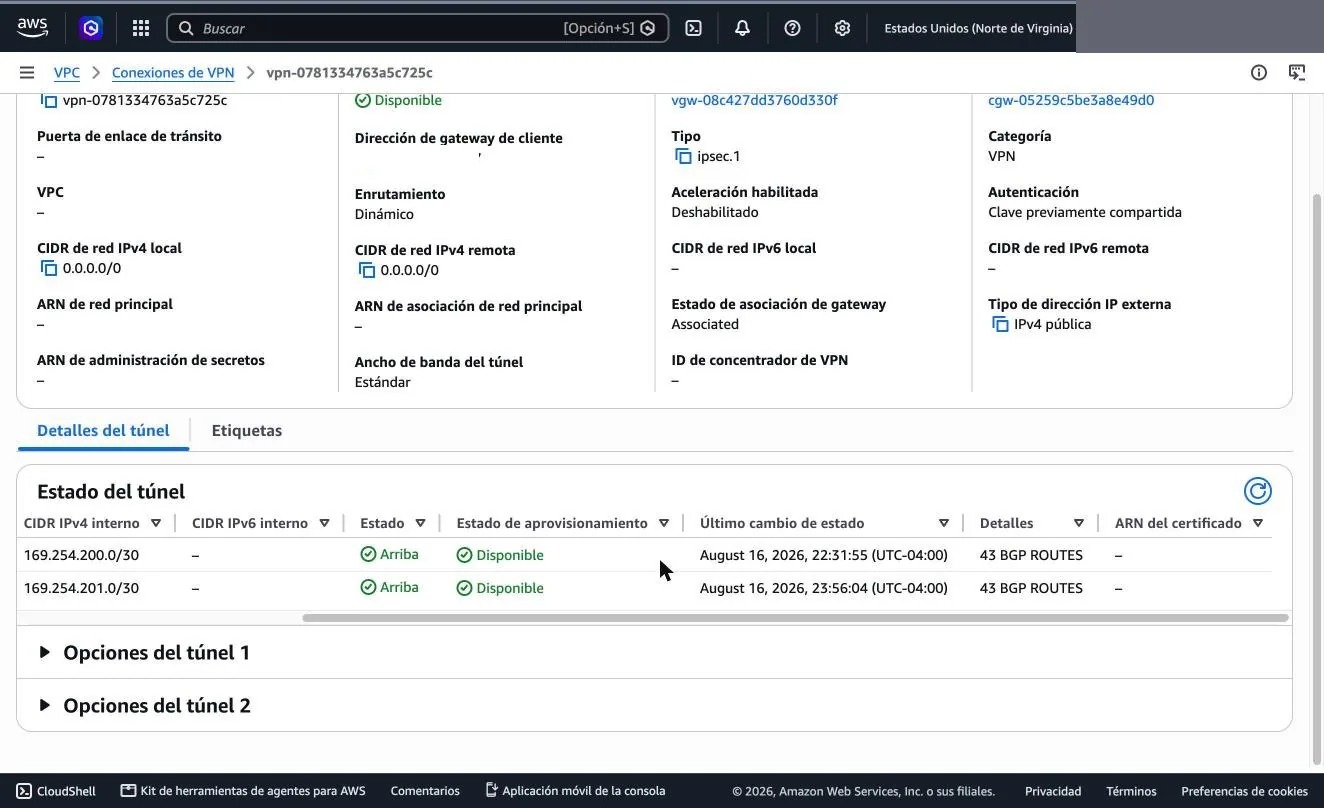
What to read here: both AWS peers in Established, 3 prefixes accepted from each —the VPC and its two app subnets— and 43 advertised towards each. Both tunnels showing identical numbers is the sign that redundancy is live and not merely configured.
The peer that already existed keeps its own counter: Advertised pfx: 54.
If that number changes when you add the new group, you touched a policy that
belonged to another peer.
The detail of one session
admin@fw-borde> show routing protocol bgp peer

  ==========
  Peer:                          AWS-VGW-2 (id 5)
  virtual router:                default
  Peer router id:                169.254.201.1
  Remote AS:                     64512
  Peer group:                    AWS (id 1)
  Peer status:                   Established, for 20118 seconds
  Passive:                       no
  Multi-hop TTL:                 1
  Remote Address:                169.254.201.1:179
  Local Address:                 169.254.201.2:40411
  Prefix limit:                  100
  Holdtime:                      30 (config 30)
  Keep-Alive interval:           10 (config 10)
  Update messages:               in        4, out        5
  Total messages:                in     2018, out     2318
  Last error:
  Flap counts:                   1, established 1 times
  Nexthop set to self:           no
  ----------
  remove private AS number:      no
  ----------
  Capability:                    Multiprotocol Extensions(1)  value: IPv4 Unicast
  Capability:                    Route Refresh(yes)
  Capability:                    4-Byte AS Number(65)  value: 64512
  ----------
  Prefix counter for:            bgpAfiIpv4 / unicast
  Incoming Prefix:               Accepted 3, Rejected 0, Policy Rej 0, Total 3
  Outgoing Prefix:               43
  Advertised Prefix:             43
Four lines worth looking at that usually get overlooked:
Local Address: 169.254.201.2againstRemote Address: 169.254.201.1— the local one is the.2. Swapped around, the tunnel comes up just the same and the session never establishes.remove private AS number: no— with every ASN private, stripping them from the AS_PATH removes loop detection.Flap counts: 1, established 1 times— it established once and never dropped again. A rising counter points at MTU or tunnel instability.Accepted 3, Rejected 0, Policy Rej 0— it separates "no routes arrive" from "they arrive and an import policy discards them".
What ends up in the forwarding table
admin@fw-borde> show routing route destination 10.20.0.0/16

flags: A:active, ?:loose, C:connect, H:host, S:static, ~:internal, R:rip, O:ospf, B:bgp,
       Oi:ospf intra-area, Oo:ospf inter-area, O1:ospf ext-type-1, O2:ospf ext-type-2, E:ecmp, M:multicast

VIRTUAL ROUTER: default (id 1)
  ==========
destination            nexthop              metric flags   age    next-AS
10.20.0.0/16           169.254.201.1        100    A?B     20117  64512
10.20.4.0/24           169.254.201.1        100    A?B     20117  64512
10.20.14.0/24          169.254.201.1        100    A?B     20117  64512
total routes shown: 3
All three prefixes come in over both tunnels, but only one survives in the
FIB: the best path, with flags A?B —active, incomplete origin,
learned via BGP. If that tunnel drops, the other takes over with no
intervention. To see all six entries before selection, look at the BGP table
with
show routing protocol bgp loc-rib.
If the firewall advertises and AWS does not accept
When the summary shows advertised prefixes but the AWS console
reports zero accepted routes, the suspect is
export-nexthop: with resolve, routes relearned
from a third peer can leave with a next-hop that AWS discards.
use-self fixes it.
VerificationWhat it looks like when it is right
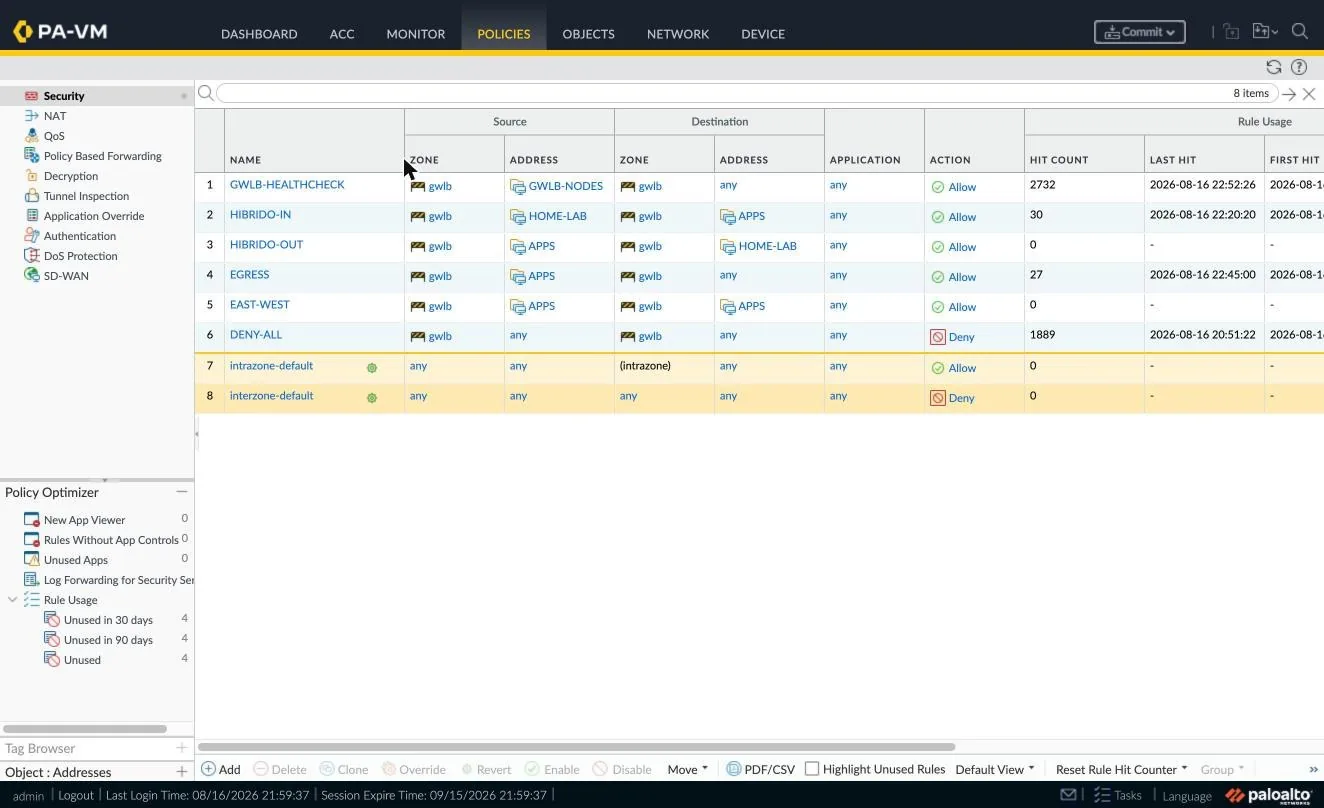
Screenshots from a working deployment. The two that matter most are the edge association and the log with the identified application: the first explains why traffic enters inspection, the second proves it actually is inspected.
In the AWS console
What the control plane has to report.
Target group · targets tab
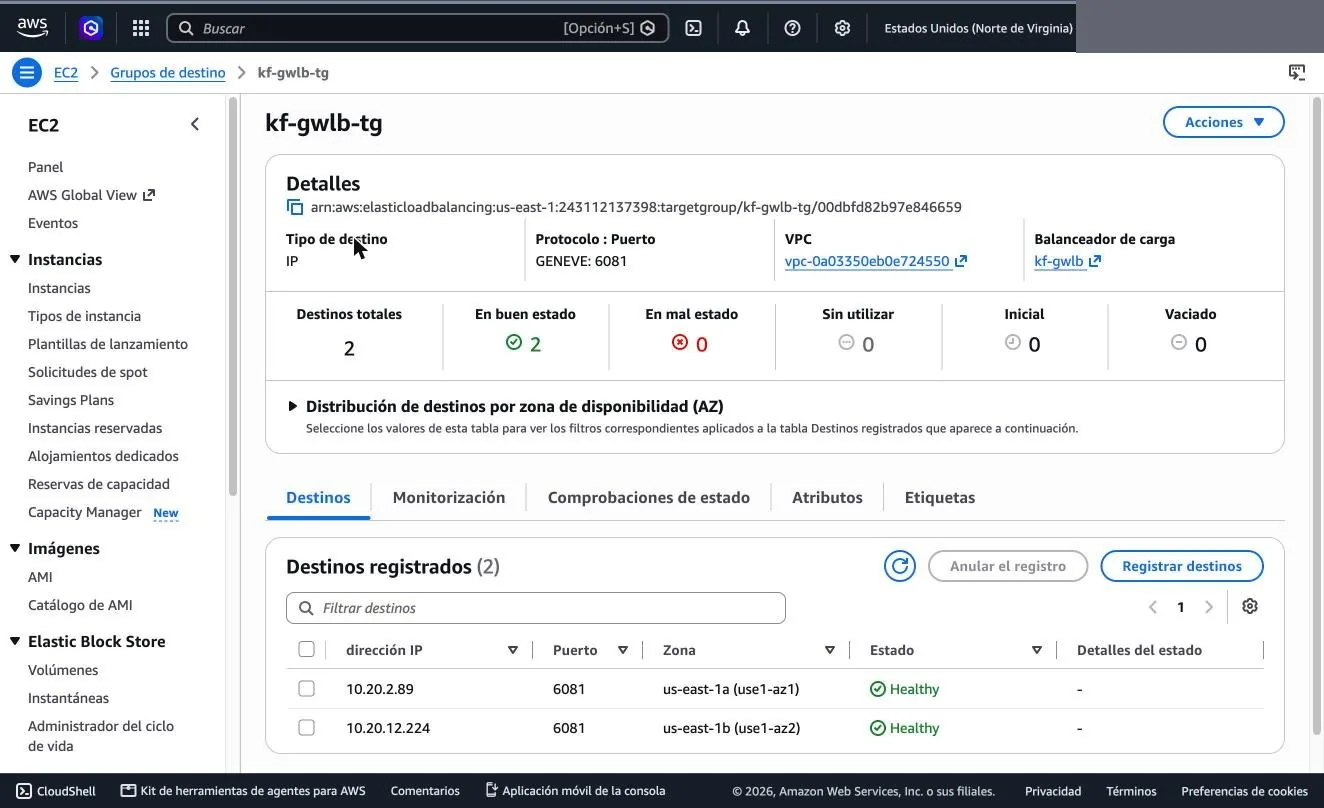
Edge route table · routes
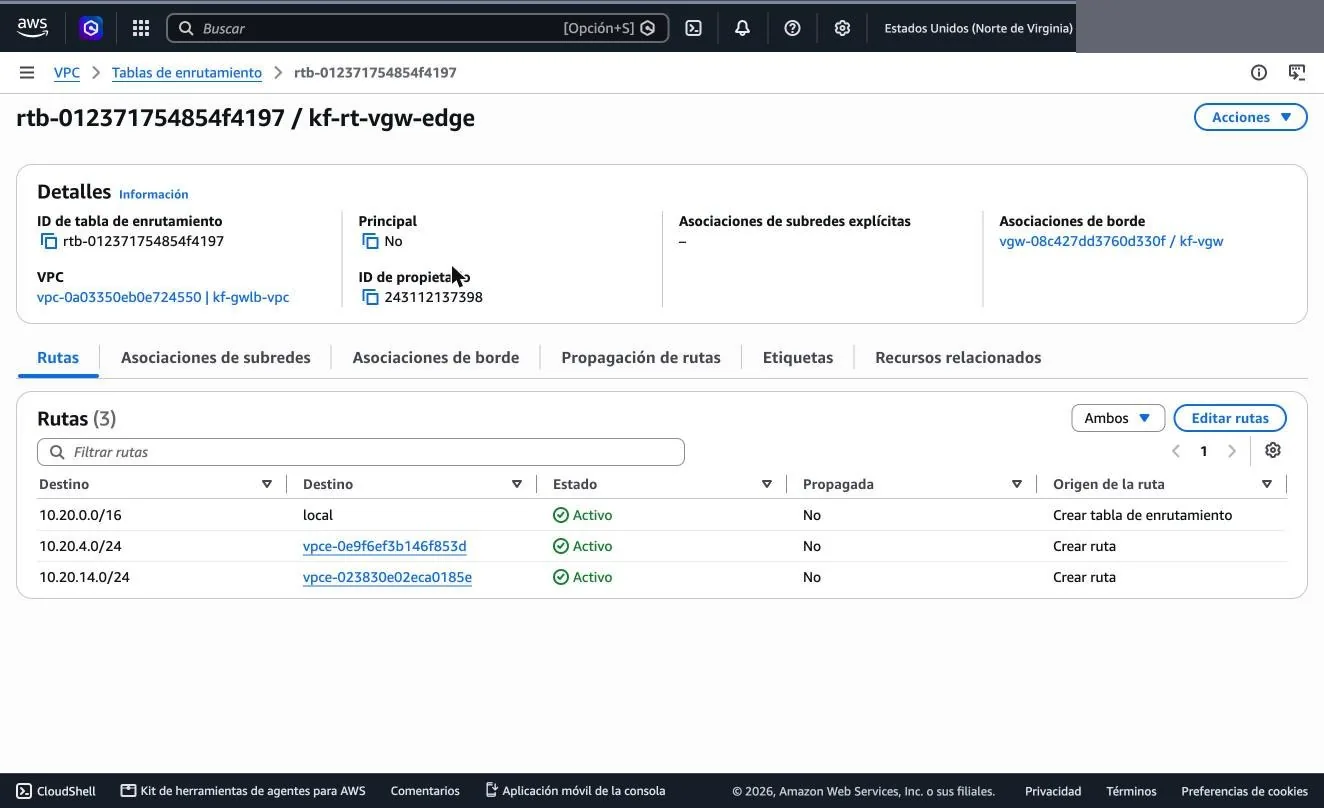
local route, which is what makes them win.Edge route table · edge association
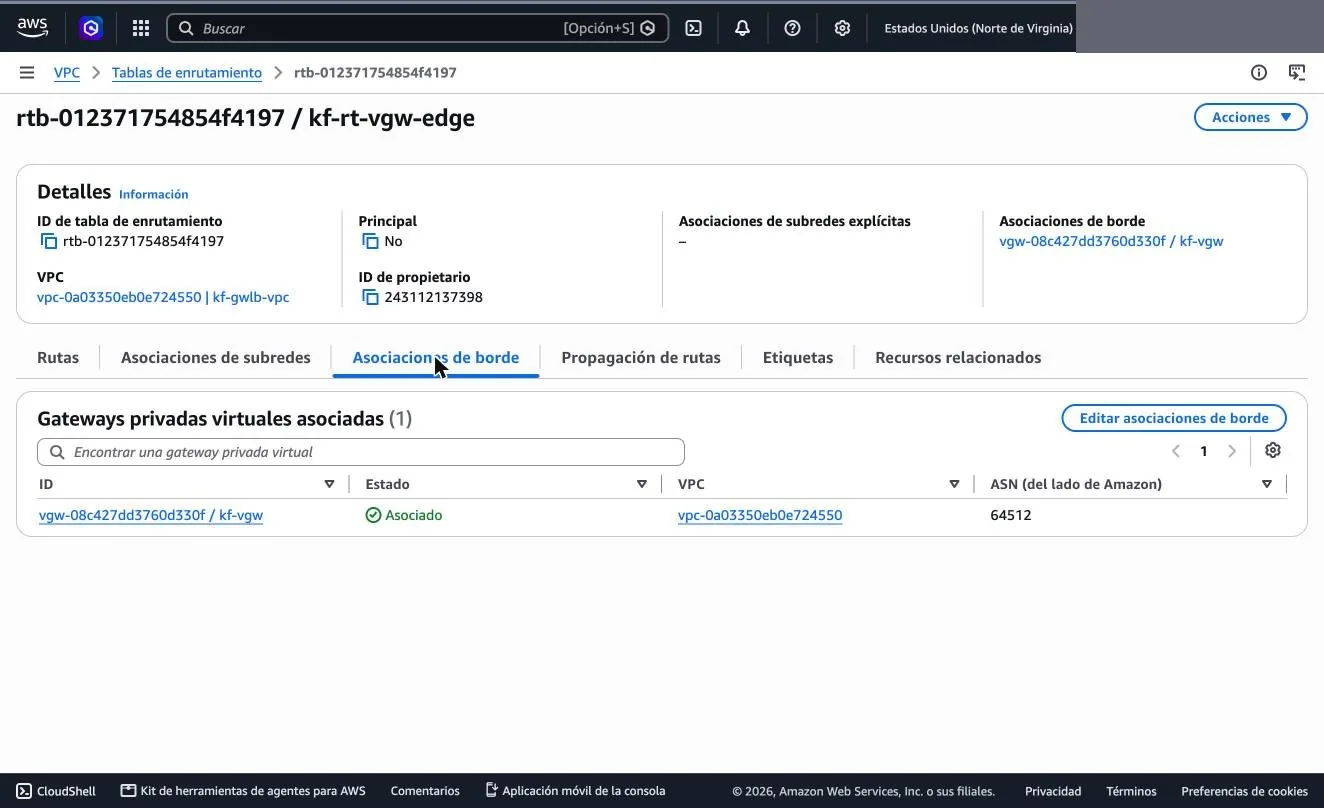
Gateway Load Balancer endpoints
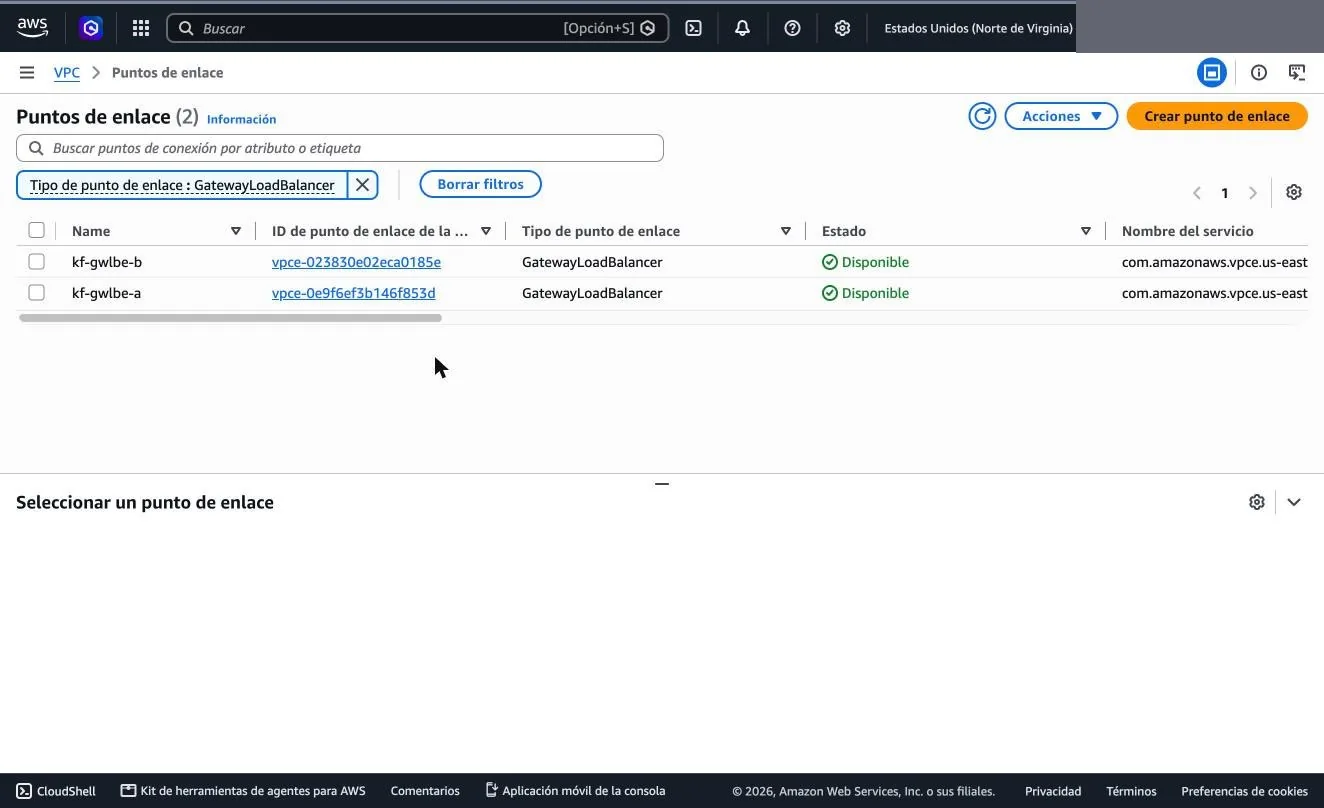
gwlbe of its zone.VPN connection · tunnel details
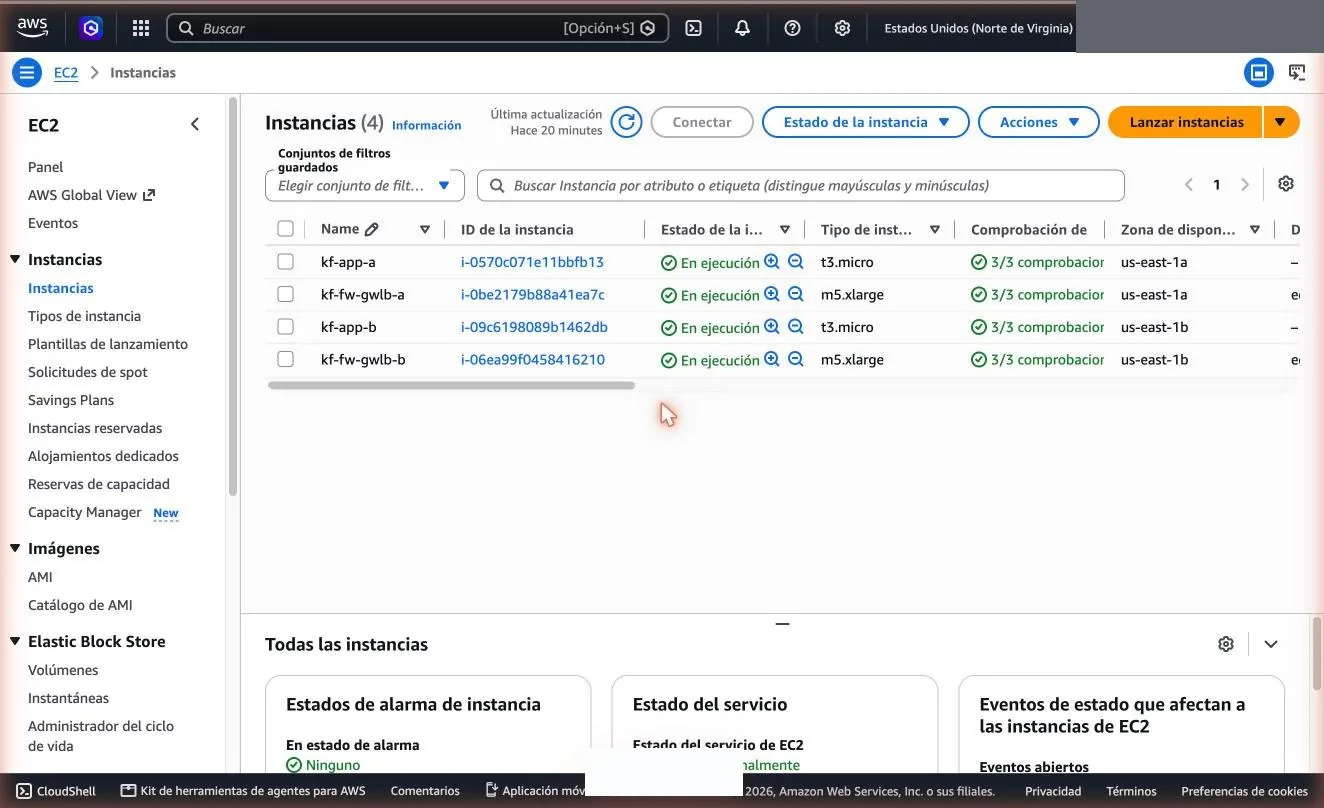
Deployment instances
On the VM-Series
What confirms there is inspection and not just transit.
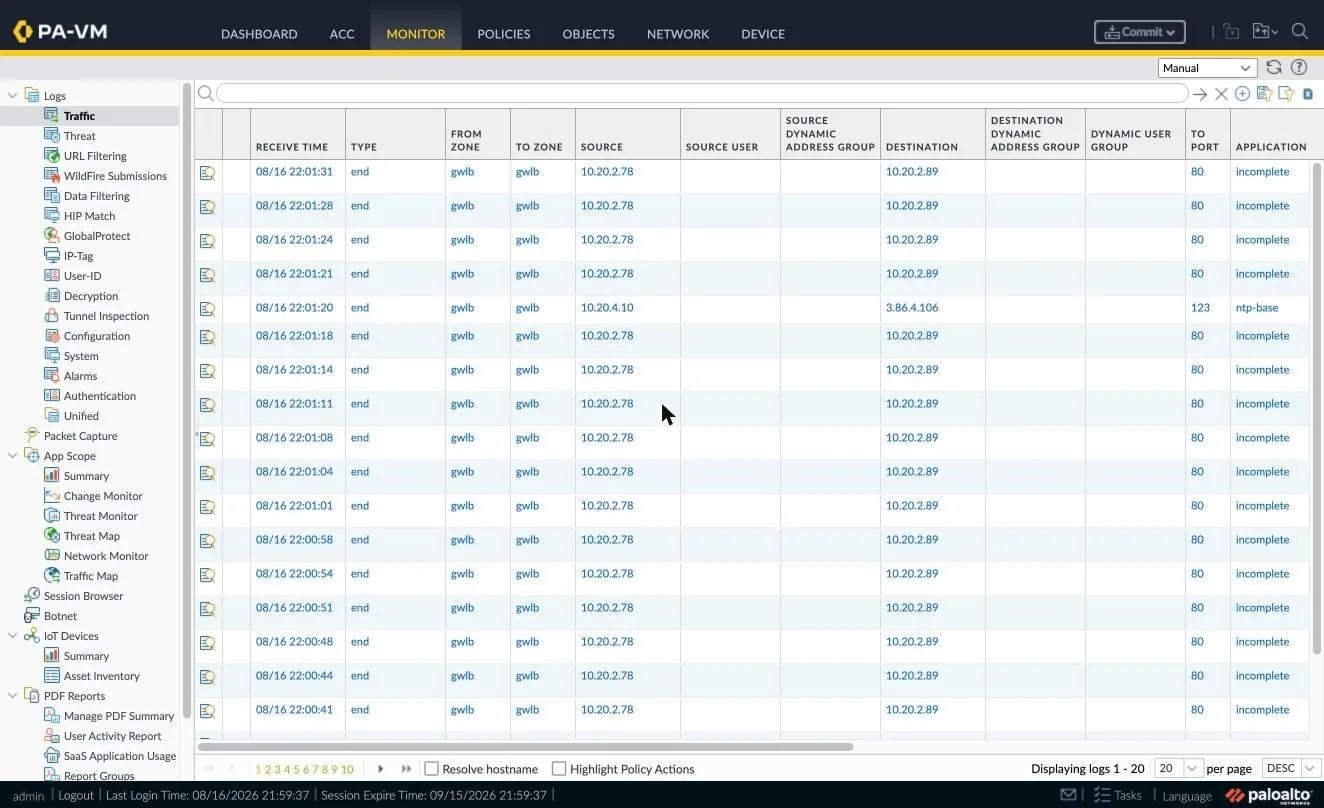
Policies · Security
Monitor · Traffic filtered by rule
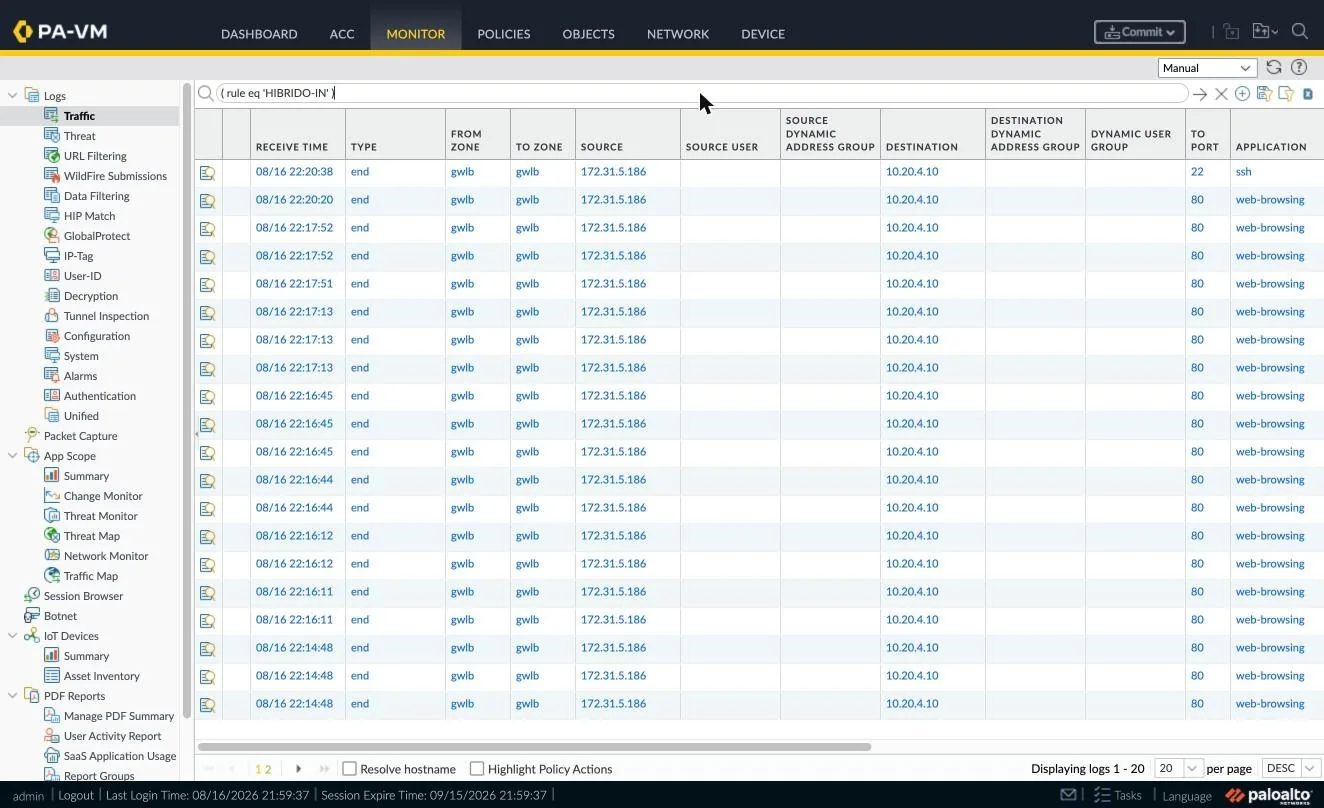
not-applicable: App-ID is seeing the inner packet, which means GENEVE decap works. If what shows up there is not-applicable, traffic flows but is not inspected.Network · Interfaces
On the edge device
Only if you also terminate a VPN against the same architecture.
IPSec Tunnels on the edge device
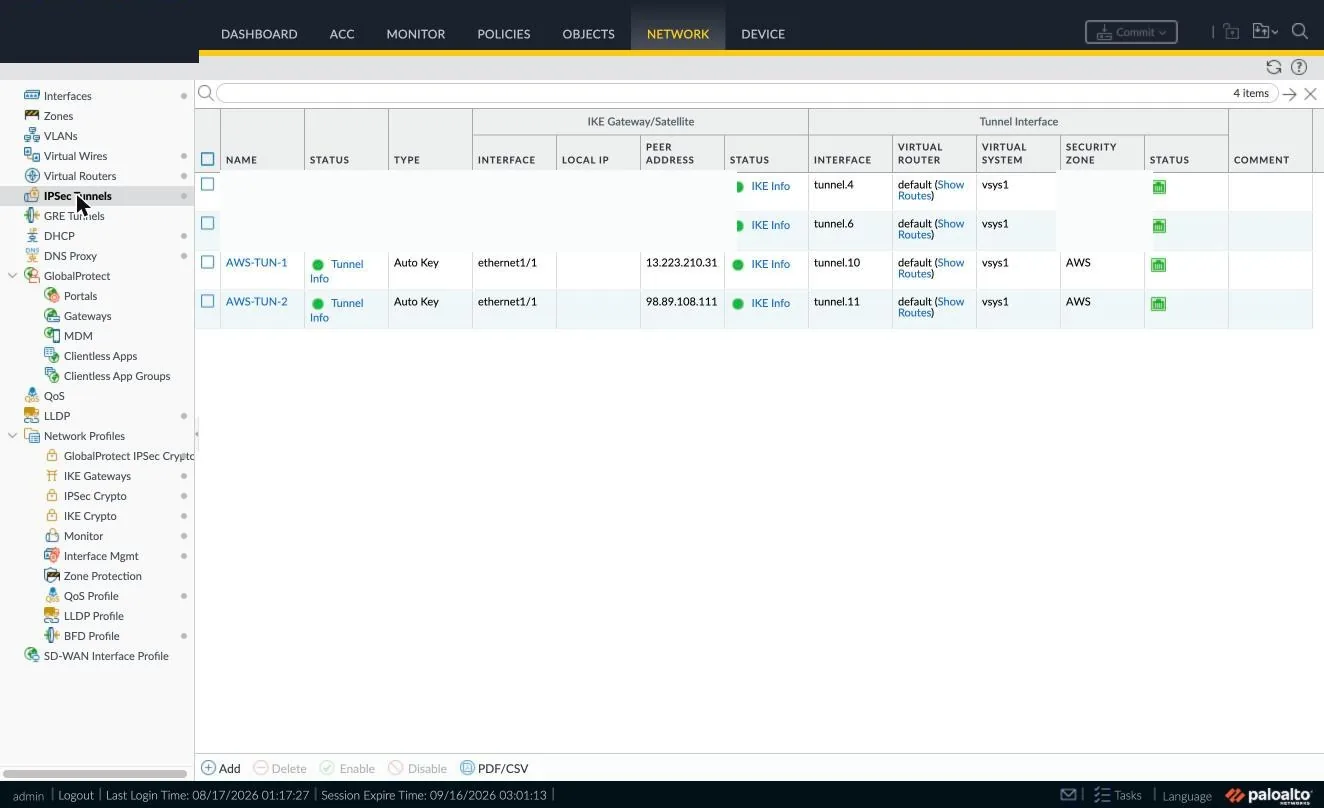
BGP · peers
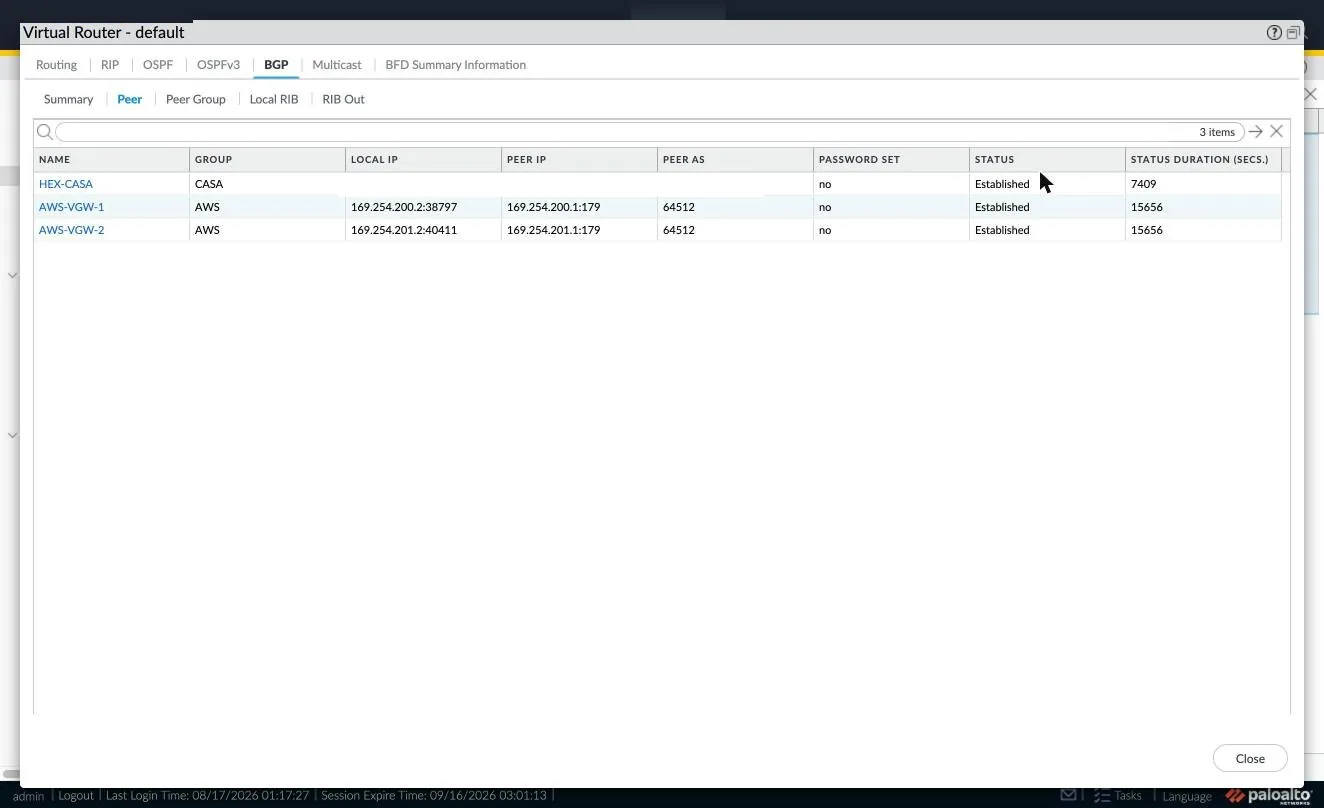
.2 and the peer in the .1 from each /30. Above, a pre-existing peer with its own uptime: when adding the new peer group, it is worth confirming the existing ones did not flap.MistakesTen that give no message
All of them turned up while building this architecture. None produces an error that points at the cause.
E1 · GWLB
GENEVE parsing is not enabled by default
- Symptom
- Everything looks healthy and not one packet is inspected. No errors.
- Cause
- PAN-OS does not decapsulate UDP 6081 until you ask it to.
overlay-routingis a different setting. - Fix
request plugins vm_series aws gwlb inspect enable yes
E2 · policy
The final deny stops the target from reaching healthy
- Symptom
Target.Timeoutpermanently, even with HTTP enabled on the management profile.- Cause
- The health check is intrazone and goes through the policy, where the final deny matches first.
- Fix
- An allow rule for TCP 80 from the data subnets, in first position.
E3 · policy
application any with application-default matches nothing
- Symptom
- Inspection rules at 0 hits from day one, with no explanation.
- Cause
- With no specific applications there is no default port to derive the service from.
- Fix
service any, or list explicit applications.
E4 · policy
New rules are born below the final deny
- Symptom
- You add a correct rule and it never matches.
- Cause
set rulebase security rulesappends to the end of the rulebase.- Fix
move ... toporbefore <cleanup>, and verify the order before committing.
E5 · CLI
The zone path changes with multi-vsys
- Symptom
Invalid syntaxwhen creating the zone, then cascading failures fromnot a valid reference.- Cause
- With multi-vsys
offthe nodevsysdoes not exist at the root. - Fix
set zonewith multi-vsys off;set vsys vsys1 zonewith multi-vsys on.
E6 · hybrid
AWS gives the first host of the /30 to the gateway, not to the customer
- Symptom
- IPsec comes up and BGP never leaves Connect.
- Cause
- In the
/30inside address of the tunnel, the.1belongs to the virtual private gateway and the.2to the customer gateway. - Fix
- Read the attributes AWS returns instead of working the addresses out by hand.
E7 · hybrid
A final any/any rule also kills intrazone traffic
- Symptom
- BGP does not establish over the
/30of the tunnel. - Cause
- A rule
from any to anyis of type universal: it matches intrazone as well as interzone. - Fix
- An explicit intrazone rule for the tunnel inside IPs, above the deny.
E8 · Terraform
The ingress inline blocks revoke whatever you add by hand
- Symptom
- Management access is lost after a
applythat was not touching that resource. - Cause
- With inline blocks, Terraform is authoritative over the entire security group.
- Fix
- Make the access variable a list and keep the IPs in code. Verify with
terraform plan -detailed-exitcode.
E9 · CLI
An 80-column PTY corrupts long commands
- Symptom
Invalid syntaxintermittently on commands that are correct.- Cause
- The CLI wraps by inserting a space in the middle:
ethernet1/1arrives asethern et1/1. - Fix
- Enlarge the PTY before spawning, or lower it with
edit <nodo>to shorten each line.
E10 · logs
direction equal backward shows the oldest
- Symptom
- Test traffic does not show up in the log even though the rule accumulates hits.
- Cause
- It returns the oldest entries, and the log is dominated by health checks.
- Fix
show log traffic rule equal <NOMBRE>
LimitationsWhat this design does not solve
East-west between app subnets is not inspected
In each app subnet's route table, the local route of the
VPC beats the default towards the endpoint on longest-prefix match.
Traffic between workloads goes direct, and the rule covering it stays at
zero hits.
Adding routes more specific than the local one is not enough: each direction
would enter through its own zone's endpoint and be inspected by a
different firewall. With a stateful device that does not work, and
stickiness does not save it, because when source and
destination swap, the hash changes. The real options are sending
east-west through a single endpoint —losing zone independence— or
accepting that this path is not inspected and removing the rule, so as
not to promise something that does not happen.
No MSS clamp on tunnel interfaces
if you also terminate a VPN against the same device, bear in mind that
adjust-tcp-mss does not exist under tunnel units in PAN-OS
11.1: the node only appears on ethernet subinterfaces. Without a clamp,
ping goes through and large TCP transfers hang. The alternative is to
clamp on the ingress LAN interfaces, at the cost of affecting all their
traffic.
The workloads depend on inspection in order to provision themselves
Their internet egress goes through the endpoint, the GWLB and the firewall.
While inspection is not working they have no internet: cloud-init cannot
reach the metadata service and the user_data never runs, with no
error visible in the console at all. That is why the end-to-end test comes
at the end of the procedure and not in the middle.